
Subaru Legacy BN/BS (2015-2019) Service Manual: Removal
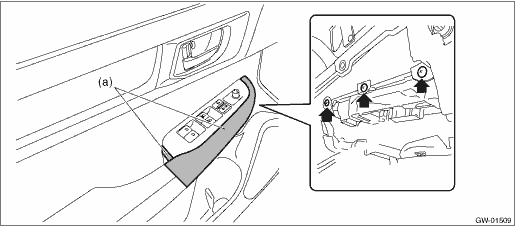
1. MAIN SWITCH 1. Disconnect the ground terminal from the battery sensor, and wait for at least 60 seconds before starting work. NOTE 2. Remove the trim panel - front door. Door Trim > REMOVAL 3. Remove the panel - power window main switch. CAUTION: Be careful not to damage the trim panel - front door with the panel - power window main switch. (1) Insert a sheet of protective paper (a) between panel - power window main switch and trim panel - front door. (2) Remove the screws.
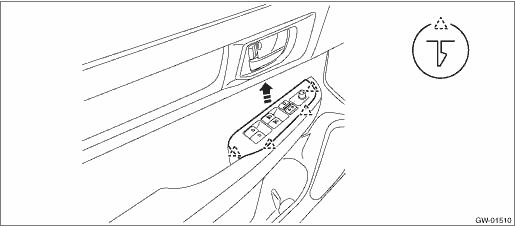
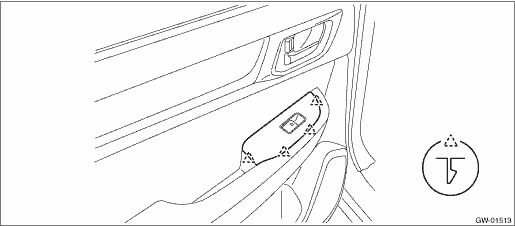
(3) Release the claws, and then remove the panel - power window main switch.
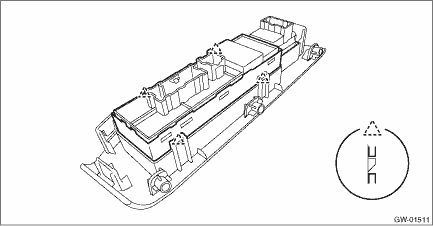
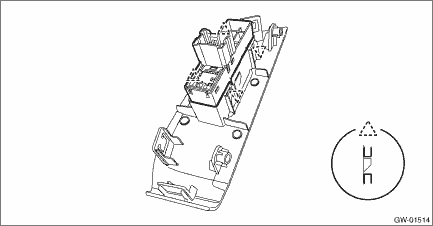
(4) Release the claws, and then remove the switch - power window main.
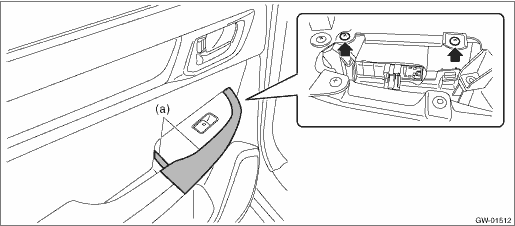
2. SUB-SWITCH Switch - power window sub front For removal of the switch - power window sub front on the passenger’s seat, refer to the removal procedure of the switch - power window main. Power Window Control Switch > REMOVAL Switch - power window sub rear 1. Disconnect the ground terminal from battery sensor. NOTE 2. Remove the trim panel - rear door. Door Trim > REMOVAL 3. Remove the panel - power window sub switch rear. CAUTION: Be careful not to damage the trim panel - rear door with the panel - power window sub switch rear. (1) Insert a sheet of protective paper (a) between panel - power window sub switch rear and trim panel - rear door. (2) Remove the screws.
(3) Release the claws, and then remove the panel - power window sub switch rear.
4. Release the claws, and then remove the switch - power window sub rear.
|

 Inspection
1. MAIN SWITCH• Driver’s seat (model with AUTO)CAUTION:• Since the switch - power window main is controlled by CPU, do not check continuity for switch alone with the circuit tester. ...
Other materials:
Vehicle Dynamics Control OFF switch
Pressing the Vehicle Dynamics Control
OFF switch deactivates the Vehicle Dynamics
Control system.
Creating an adequate driving wheel slip by
deactivating the Vehicle Dynamics Control
system temporarily may help to escape
from the following situations. Use the
Vehicle Dynamics Control OF ...
