
Subaru Legacy BN/BS (2015-2019) Owners Manual: Control screen and audio panel
Subaru Legacy BN/BS (2015-2019) Owners Manual / Audio / Audio set / CD / Control screen and audio panel
NOTE
|
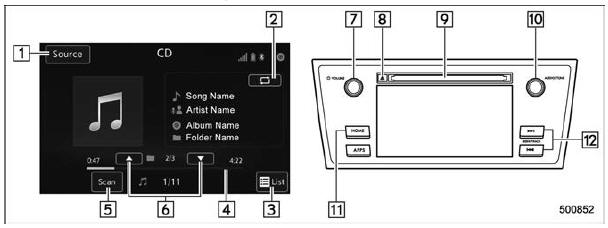
 CD
CD
...
 Loading a disc
CAUTION
Never try to disassemble the audio
kit or lubricate any part of the CD
player. Do not insert anything other
than a disc into the slot.
Insert a disc into the disc slot ...
Other materials:
Removal
1. Lift up the vehicle, and then remove the rear wheels.2. Remove the nut - axle.CAUTION:Do not loosen the nut - axle while the rear axle is loaded. Doing so may damage the hub unit COMPL.(1) Lift the crimped section of the nut - axle.(2) Remove the nut - axle using a socket wrench while depressing ...
© 2017-2026 Copyright www.sulegacy.com
