
Subaru Legacy BN/BS (2015-2019) Owners Manual: General settings
Subaru Legacy BN/BS (2015-2019) Owners Manual / Audio / Audio set / Unit settings / General settings
Touch the
|
 tab for the audio unit
basic
settings.
tab for the audio unit
basic
settings.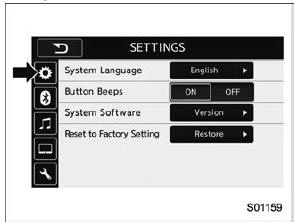
 Unit settings
Sound quality adjustment, screen adjustment,
and information of the audio unit are
displayed.
Press the HOME button on the audio
panel.
Touch the "SETTINGS" key.
Select t ...
 Bluetooth settings
Touch the tab to set Bluetooth
Item
Function
BT Devices
Connection
Select to pair/connect the Bluetooth
devices
In-Car-Device
setting
Select to ...
Other materials:
Specification
1. COMBINATION METER ASSEMBLYNOTE:Specifications of the combination meter vary depending on the market and the grade.Meter, displayOperation method, display methodDrive controlWhen checking the indicator needle operation/needle reading operationSpeedometerStepping motor typeCombination meter — Tac ...
© 2017-2026 Copyright www.sulegacy.com
