
Subaru Legacy BN/BS (2015-2019) Owners Manual: Operating the front passenger's window
To open: Press the switch down lightly and hold it. The window will open as long as the switch is held. For some models, this switch also has a one-touch auto down function. To open the window fully, press the switch down until it clicks and then release it. To stop the window halfway, pull the switch up lightly. To close: Pull the switch up lightly and hold it. The window will close as long as the switch is held. For some models, this switch also has a one-touch auto up function. To close the window fully, pull the switch up until it clicks and then release it. To stop the window halfway, press the switch down lightly. NOTE If the vehicle's battery is disconnected due to situations such as battery or fuse replacement, the one-touch auto up/down function will be deactivated. Initialize the power window to reactivate the one-touch auto up/down function. Refer to "Initialization of power window" . Anti-entrapment function (models with one-touch auto up/down function) Refer to "Anti-entrapment function" 36. |
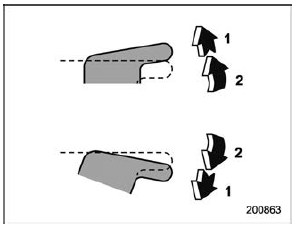
 Passenger's side power window switches
Each passenger window can be controlled
by the power window switch located on
the door. ...
 Operating the rear passenger's windows
To open:
Press the switch down and hold it until the
window reaches the desired position.
To close:
Pull the switch up and hold it until the
window reaches the desired position.
When the ...
Other materials:
2.5 L models
1) Brake fluid reservoir/Clutch fluid reservoir
(MT) (page 11-20)
2) Fuse box (page 11-38)
3) Windshield washer tank (page 11-32)
4) Battery (page 11-37)
5) Engine oil filler cap (page 11-11)
6) Engine coolant reservoir (page 11-15)
7) Radiator cap (page 11-15)
8) Engine oil filter (page ...
