
Subaru Legacy BN/BS (2015-2019) Service Manual: Removal
1. TOUCH SENSOR UPR 1. Disconnect the ground terminal from battery sensor. NOTE 2. Remove the touch sensor LWR. Power Rear Gate Touch Sensor > REMOVAL 3. Remove the power rear gate touch sensor UPR. CAUTION: • The touch sensor UPR can be removed only when it is defective because it is secured with double-sided tape. • When removing the touch sensor UPR, be careful not to deform the touch sensor UPR bracket. • Always replace the touch sensor UPR with a new part after removal. (1) Affix masking tape on the touch sensor UPR bracket so that the tape runs along the touch sensor UPR. (2) Remove the rubber clip and remove the power rear gate touch sensor UPR.
2. TOUCH SENSOR LWR 1. Disconnect the ground terminal from battery sensor. NOTE 2. Remove the trim panel - rear gate. Rear Gate Trim > REMOVAL 3. Remove the power rear gate touch sensor LWR. (1) Remove the screws and clips. (2) Disconnect the connector and remove the power rear gate touch sensor LWR.
|
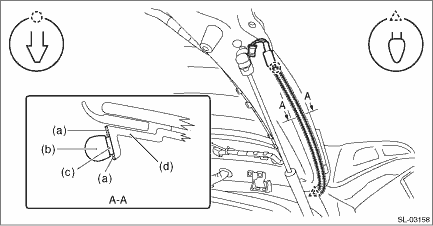
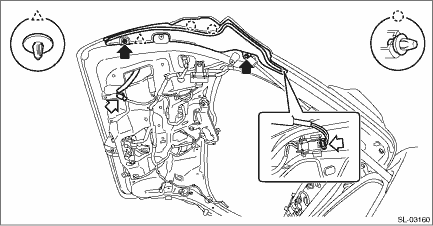

 Installation
1. TOUCH SENSOR UPR1. Install the power rear gate touch sensor UPR.(1) Clean the bracket surface of the touch sensor UPR to remove dust and dirt fully.(2) Using a sponge, apply primer to the bracket s ...
Other materials:
Disassembly
CAUTION:Be careful not to allow foreign matter to enter the brake hose connector.1. Remove mud and foreign matter from the caliper body assembly.2. Remove the piston - disc brake.(1) Place a wooden block in the caliper body as shown in the figure to prevent the piston - disc brake from jumping out a ...
