
Subaru Legacy BN/BS (2015-2019) Service Manual: Removal
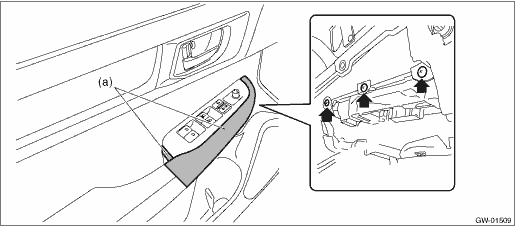
1. MAIN SWITCH 1. Disconnect the ground terminal from the battery sensor, and wait for at least 60 seconds before starting work. NOTE 2. Remove the trim panel - front door. Door Trim > REMOVAL 3. Remove the panel - power window main switch. CAUTION: Be careful not to damage the trim panel - front door with the panel - power window main switch. (1) Insert a sheet of protective paper (a) between panel - power window main switch and trim panel - front door. (2) Remove the screws.
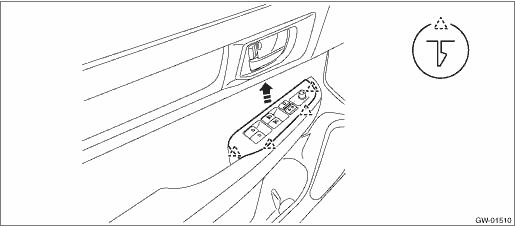
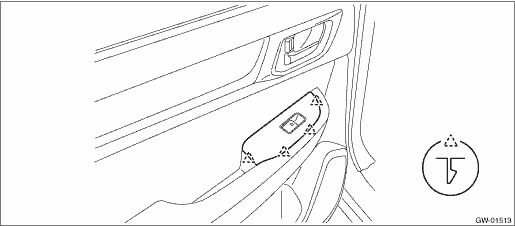
(3) Release the claws, and then remove the panel - power window main switch.
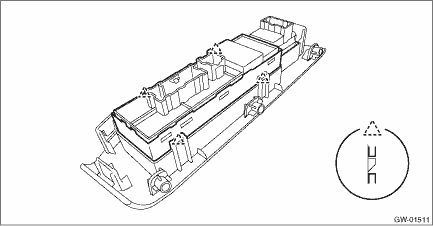
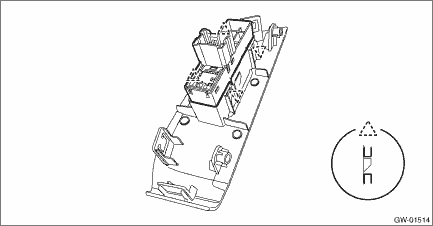
(4) Release the claws, and then remove the switch - power window main.
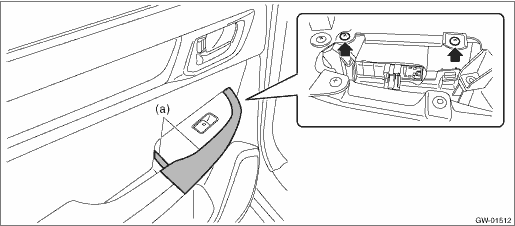
2. SUB-SWITCH Switch - power window sub front For removal of the switch - power window sub front on the passenger’s seat, refer to the removal procedure of the switch - power window main. Power Window Control Switch > REMOVAL Switch - power window sub rear 1. Disconnect the ground terminal from battery sensor. NOTE 2. Remove the trim panel - rear door. Door Trim > REMOVAL 3. Remove the panel - power window sub switch rear. CAUTION: Be careful not to damage the trim panel - rear door with the panel - power window sub switch rear. (1) Insert a sheet of protective paper (a) between panel - power window sub switch rear and trim panel - rear door. (2) Remove the screws.
(3) Release the claws, and then remove the panel - power window sub switch rear.
4. Release the claws, and then remove the switch - power window sub rear.
|

 Inspection
1. MAIN SWITCH• Driver’s seat (model with AUTO)CAUTION:• Since the switch - power window main is controlled by CPU, do not check continuity for switch alone with the circuit tester. ...
Other materials:
Dtc u0424 invalid data received from hvac control module
DTC DETECTING CONDITION:Defective data was transmitted from A/C CM.TROUBLE SYMPTOM:Cooperation control of air conditioner does not operate properly.STEPCHECKYESNO1.CHECK PERFORMING OF BASIC DIAGNOSTIC PROCEDURE.Was the basic diagnostic procedure performed up to STEP 8- Diagnostic Procedure with Diag ...
