
Subaru Legacy BN/BS (2015-2019) Service Manual: Inspection
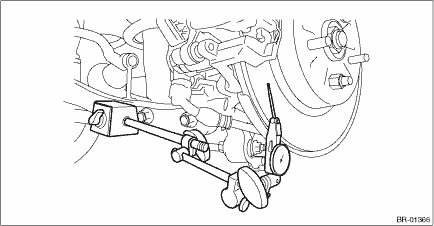
1. DISC ROTOR RUNOUT CHECK 1. Check the hub unit COMPL - rear axle for free play and runout before the inspection of disc rotor runout limit. Rear Hub Unit Bearing > INSPECTION 2. Check the disc rotor runout. (1) Remove the caliper body assembly. Rear Disc Brake Assembly > REMOVAL (2) Secure the disc rotor by tightening the five wheel nuts. (3) Set a dial gauge 10 mm (0.39 in) inward from the disc rotor outer circumference, and check the outer disc rotor runout while rotating the disc rotor. Disc rotor runout limit: 0.05 mm (0.0020 in)
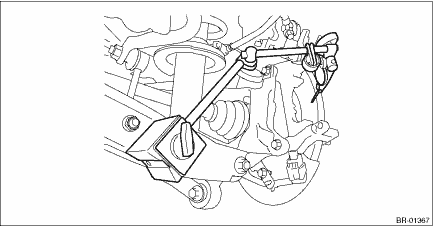
(4) Set a dial gauge 10 mm (0.39 in) inward from the disc rotor outer circumference, and check the inner disc rotor runout while rotating the disc rotor. Disc rotor runout limit: 0.05 mm (0.0020 in)
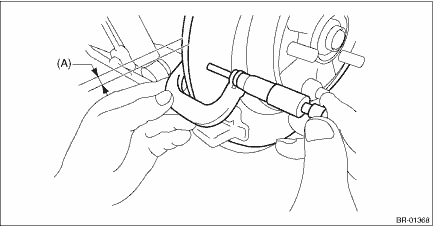
3. If the disc rotor runout exceeds service limit, grind the disc rotor. 4. Check the disc rotor thickness after grinding. Rear Disc Rotor > INSPECTION 2. DISC ROTOR THICKNESS CHECK 1. Remove the caliper body assembly. Rear Disc Brake Assembly > REMOVAL 2. Set a micrometer 17 mm (0.67 in) inward from the disc rotor outer perimeter, and then measure the disc rotor thickness (A).
3. If the wear limit is exceeded in the inspection, replace the disc rotor. |
 Removal
1. Release the parking brake.2. Using the Subaru Select Monitor, go to the brake maintenance mode according to the display screen. Parking Brake System > OPERATIONNOTE:For detailed operation procedur ...
 Installation
NOTE:Before installation, remove mud and foreign matter from the disc brake assembly.1. Check the rear disc rotor. Rear Disc Rotor > INSPECTION2. Install the rear disc rotor.NOTE:When installing the ...
Other materials:
Tire
Model2.5 L DOHC non-turbo3.6 L DOHC non-turboWheel size17 - 7J18 - 7JTire size225/65R17 102H225/60R18 100HTypeTubeless, steel belted radial ...
