
Subaru Legacy BN/BS (2015-2019) Service Manual: Operation
1. While the ABS sequence control is being performed, the operation of the hydraulic unit can be checked using the brake tester or pressure gauge after the hydraulic unit solenoid valve operation. 2. ABS sequence control can be started by the Subaru Select Monitor. 1. ABS SEQUENCE CONTROL WITH SUBARU SELECT MONITOR NOTE: In the event of any trouble, the ABS sequence control will not operate. 1. Connect the Subaru Select Monitor to data link connector. NOTE: For detailed operation procedures, refer to “Application help”. (1) Turn the ignition switch to ON. (2) On «Start» display, select «Diagnosis». (3) On «Vehicle selection» display, input the target vehicle information and select «Confirmed». (4) On «Main Menu» display, select «Each System». (5) On «Select System» display, select «Brake Control System» and select «Enter». (6) On «Select Function» display, select «Work Support». (7) On «Work Support» display, select «ABS Sequence Control Mode». 2. Follow the procedures displayed in the Subaru Select Monitor to execute the following. (1) When using a brake tester, depress the brake pedal with a force of 100 N (10.2 kgf, 22.5 lbf). (2) When using a pressure gauge, press the brake pedal so that the pressure gauge indicates 3,500 kPa (36 kgf/cm2, 511 psi). 3. The brake system being operated is displayed on the Subaru Select Monitor. 2. CONDITIONS FOR ABS SEQUENCE CONTROL NOTE: The control operation starts at point A.
|
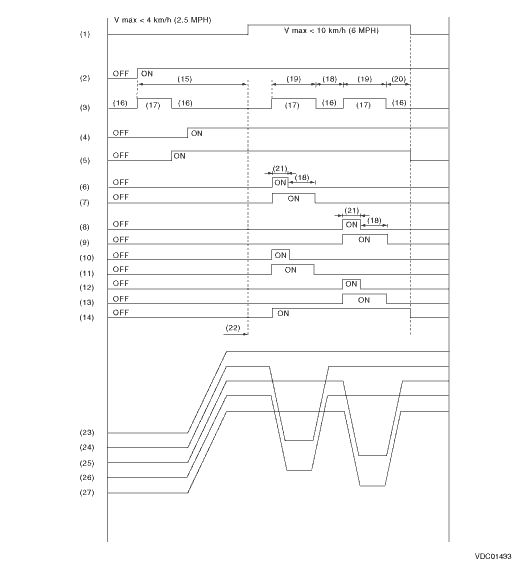
 Specification
1. CONDITIONS FOR COMPLETION OF ABS SEQUENCE CONTROLWhen the following conditions develop, the ABS sequence control stops and ABS operation is returned to the normal control mode.• When the spee ...
 Brake lamp relay
...
Other materials:
Combination meter illumination
When the ignition switch is turned to the
"ON" position, the various parts of the
combination meter are illuminated in the
following sequence.
Warning lights, indicator lights, meter
needles, gauge needles and liquid crystal
display illuminate.
The meter and gauge needles sw ...
