
Subaru Legacy BN/BS (2015-2019) Service Manual: Removal
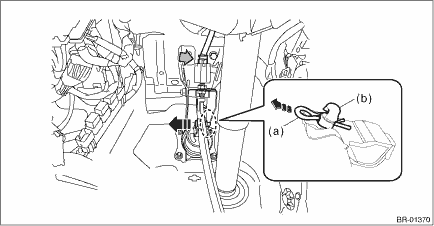
1. CVT MODEL 1. Disconnect the ground terminal from the battery sensor, and wait for at least 60 seconds before starting work. NOTE 2. Remove the cover assembly - instrument panel LWR driver. Instrument Panel Lower Cover > REMOVAL 3. Remove the panel - knee guard. Steering Column > REMOVAL 4. Remove the column assembly - steering. Steering Column > REMOVAL 5. Remove the brake pedal assembly. (1) Disconnect the stop light switch connector. (2) Remove the snap pin (a) and clevis pin (b), and remove the operating rod from the brake pedal. CAUTION: • Be careful not to apply excessive force to the operating rod when handling the operating rod. The angle may change by ±3°, and it may result in damage to power piston cylinder. • Do not change the push rod length.
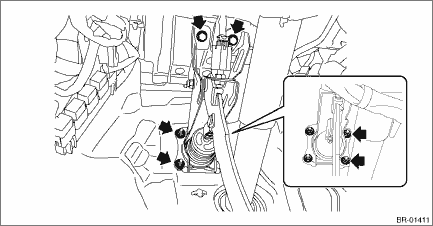
(3) Remove the bolt and nut, and then detach the brake pedal assembly.
2. MT MODEL NOTE: Brake pedal is integrated with the clutch pedal. For removal procedures of the brake pedal, refer to Clutch section. Clutch Pedal > REMOVAL |
 Brake pedal
...
 Inspection
1. Move the pad - brake pedal in a horizontal direction with a force of approx. 10 N (1 kgf, 2 lbf), and check that the pedal deflection is in the range of specifications.CAUTION:If excessive deflecti ...
Other materials:
Transfer clutch pressure test inspection
1. EXCEPT FOR OUTBACK MODEL1. Lift up the vehicle.2. Remove the rear exhaust pipe from center exhaust pipe.3. Remove the center exhaust cover.4. Set the transmission jack under the transmission.5. Remove the mounting bolt of rear crossmember.6. Lower the rear side of transmission until the transfer ...
