
Subaru Legacy BN/BS (2015-2019) Owners Manual: Station list
Subaru Legacy BN/BS (2015-2019) Owners Manual / Audio / Audio set / Pandora (if equipped) / Station list
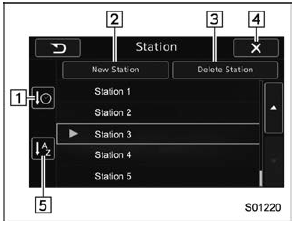
You can select, add or delete a station. When the tab is touched on the main screen, a station list will be displayed.
Store the station You can register a station.
Delete the station You can delete a station.
|
 tab on the
Pandora
main screen.
tab on the
Pandora
main screen. tab on the
Pandora top
screen.
tab on the
Pandora top
screen. Connecting a smartphone
Connect the iPhone/iPod touch to the
USB port or connect the Android device
by using Bluetooth connection (SPP and
A2DP profile).
For details about connecting an
iPhone/iPod touch: Refe ...
 CD
CD
...
Other materials:
Inspection
1. Check the continuity between the connectors.Preparation tool:Circuit testerTerminal No.Inspection conditionsSpecification4 (COM) — 5 (GND)AlwaysContinuity exists7 (SSW1) — 5 (GND)Push button ignition switch released > pressedContinuity exists2 (SSW2) — 5 (GND)Push button ignition switch rel ...
© 2017-2026 Copyright www.sulegacy.com
