
Subaru Legacy BN/BS (2015-2019) Owners Manual: Touch screen gestures
Subaru Legacy BN/BS (2015-2019) Owners Manual / Audio / Audio set / Basic information before use / Touch screen gestures
Operations are performed by touching the touch screen directly with your finger.
*: The above operations may not be performed on all screens. NOTE There may be a delayed response to flick operation that are performed at high altitudes. |
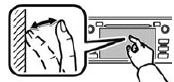
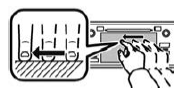
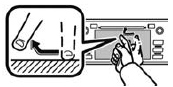
 Basic information before use
WARNING
When the vehicle is stopped with the
engine running, always apply the
parking brake for safety. Failure to
do so may result in loss of control of
your vehicle and cause a ...
 Touch screen operation
This system is operated mainly by the
keys on the screen.
When a screen key is touched, a beep
sounds. You can set the beep sound.
Refer to "Unit settings" .
NOTE
If the system does ...
Other materials:
How to read wiring diagrams
1. POWER SUPPLY CIRCUITCircuits are described to indicate the power supply in the wiring diagram of each system. “MB-5”, “MB-6”, etc., which are used as power- supply symbols throughout the text, correspond with those shown in the “DC POWER SUPPLY CIRCUIT” in the ...
© 2017-2026 Copyright www.sulegacy.com
