
Subaru Legacy BN/BS (2015-2019) Owners Manual: Turning the system on and off
Subaru Legacy BN/BS (2015-2019) Owners Manual / Audio / Audio set / Basic operation / Turning the system on and off
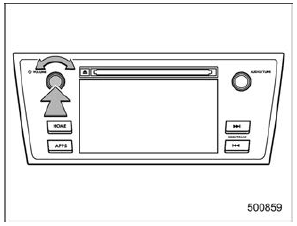
Press the power/VOLUME knob to turn the audio/visual system on and off. When the system turns on, the mode that was in use the last time the system was turned off will be displayed. Press and hold the knob to turn the display off. Turn this knob to adjust the volume. |
 Basic operation
This section describes some of the basic
features of the audio/visual system. Some
information may not pertain to your system.
Your audio/visual system works when the
ignition switch is turned t ...
 Selecting an audio source
Press the AUDIO/TUNE knob.
Select the desired source.
Example: Source select screen
NOTE
If the audio control screen appears,
select the "Source" key on the audio
sc ...
Other materials:
Preparation tool
1. SPECIAL TOOLILLUSTRATIONTOOL NUMBERDESCRIPTIONREMARKS0920287002000REMOVER AND REPLACERUsed for removing and installing valve spring.498277200STOPPER SETUsed for preventing the torque converter from falling when removing and installing the engine. (CVT model)498457000ENGINE STAND ADAPTER RH• ...
© 2017-2026 Copyright www.sulegacy.com
