
Subaru Legacy BN/BS (2015-2019) Service Manual: Event record data operation
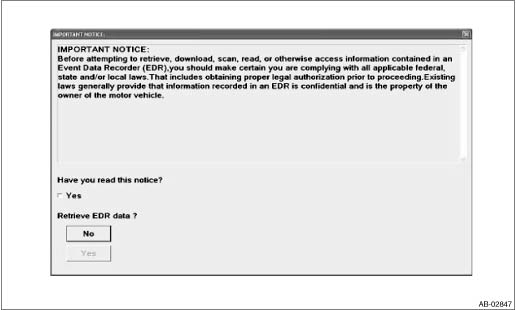
1. On «Start» display, select «Diagnosis». 2. On «Vehicle selection» display, input the target vehicle information and select «Confirmed». 3. On «Main Menu» display, select «Each System». 4. On «Select System» display, select «Airbag» and select «Enter». 5. On «Airbag» display, select «Work Support». 6. On «Work Support item» display, select «Event Record Data». After selection, «IMPORTANT NOTICE» screen is displayed. 7. After checking the content of «IMPORTANT NOTICE», click the checkbox for “Yes”. 8. If the applicable law is not violated, click the «Yes» button to display the EDR data.
9. Select the items to be checked from each event record data. 10. Select the record data to be checked from each record data. 11. The selected record data is displayed. If there is no data recorded, «Event record data are not recorded» is displayed. 12. Select «Exit» to return to each event record data screen. |
 Electrical component location location
(1)Front sub sensor RH(12)Seat belt pretensioner RH(23)Fuse box(2)Front sub sensor LH(13)Seat belt pretensioner LH(24)Front door impact sensor LH(3)Airbag control module(14)Curtain airbag sensor RH(25 ...
 Inspection mode procedure
Recreate the circumstance by referring to the conditions described in the checklist. ...
Other materials:
Front seat heater (if equipped)
Front seat heater switch
HIGH mode indicator
MID mode indicator
LOW mode indicator
Driver's side
Front passenger's side
Press the front seat heater switch. Each
time you press the switch, the mode will
change as follows.
When LOW mode is select ...
