
Subaru Legacy BN/BS (2015-2019) Owners Manual: Help line
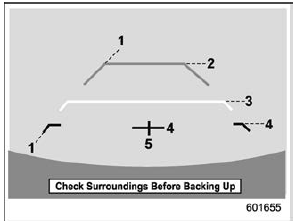
The help line (distance marker and vehicle width line) is a guide to help you realize the actual distance from the screen.
1) Vehicle width line (oblique vertical line) When the shift lever or select lever is set to position "R", the monitor screen displays the help lines together with the rear view image.
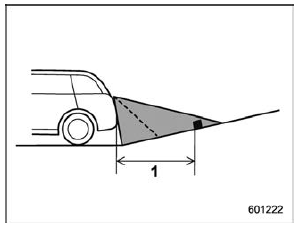
NOTE If you shift to the "R" range shortly after turning on the ignition switch, the warning message "Check Surroundings Before Backing Up" may not be displayed. Wait for several seconds or more after turning on the ignition switch before shifting to the "R" range. Then the warning message will be displayed. Difference between screen and actual road The distance markers show the distance for a level road when the vehicle is not loaded. It may be different from the actual distance depending on the loading conditions or road conditions. When there is an upward slope at the back
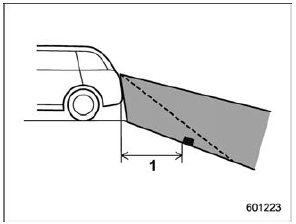
1) 3 feet (1 m) The distance on the screen looks farther than the actual distance. When there is a downward slope at the back
1) 3 feet (1 m) The distance on the screen looks nearer than the actual distance. NOTE When cargo is loaded, the rear view distance on the screen looks farther than the actual distance as in an upward slope. Feature of distance marker
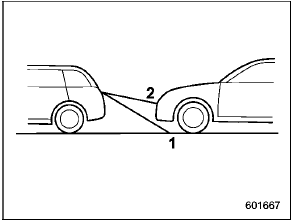
1) 3 feet (1 m) line The distance marker shows the distance on the road. If there is a car or other object close behind, distance cannot be correctly displayed. |
 Viewing range on the screen
Range of view
Range of view
Image from camera
The area from the rear end of the bumper
can be viewed. Areas at both ends of the
bumper and areas just under the bumper
cannot be viewe ...

Other materials:
Removal
1. Lift up the vehicle, and then remove the rear wheels.2. Remove the trailing link. Rear Trailing Link > REMOVAL3. Remove the lateral link assembly - front.(1) Remove the snap pin (a) and nut (b).(2) Remove the ball joint from the housing assembly - rear axle.Preparation tool:Tie-rod ball joint pu ...
