
Subaru Legacy BN/BS (2015-2019) Service Manual: Inspection
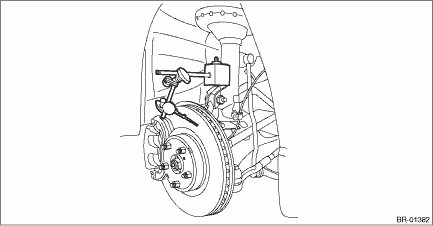
1. DISC ROTOR RUNOUT CHECK 1. Check the hub unit COMPL - front axle for free play and runout before the inspection of disc rotor runout limit. Front Hub Unit Bearing > INSPECTION 2. Tighten the wheel nuts to secure disc rotor. 3. Set a dial gauge 10 mm (0.39 in) inward from the disc rotor outer circumference, and check the disc rotor runout while rotating the disc rotor. Disc rotor runout limit: 0.05 mm (0.0020 in)
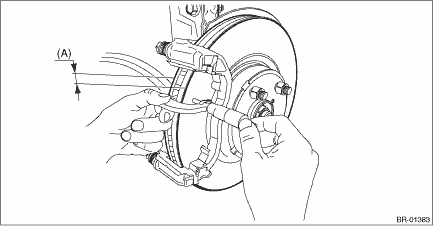
4. If the disc rotor runout exceeds service limit, grind the disc rotor. 5. Check the disc rotor thickness after grinding. Front Disc Rotor > INSPECTION 2. DISC ROTOR THICKNESS CHECK 1. Set a micrometer 10 mm (0.39 in) inward from the disc rotor outer perimeter, and then measure the disc rotor thickness (A).
2. If the wear limit is exceeded in the inspection, replace the disc rotor. |
 Removal
1. Lift up the vehicle, and then remove the front wheels.2. Remove the disc brake assembly.(1) Remove the brake hose bracket.(2) Remove the mounting bolt, and remove the disc brake assembly.(3) Prepar ...
 Installation
NOTE:Before installation, remove mud and foreign matter from the disc brake assembly.1. Check the front disc rotor. Front Disc Rotor > INSPECTION2. Install the disc rotor.3. Install the disc brake as ...
Other materials:
Location
Main fuse box (M/B)Fuse 40 A(A)Fuse 30 A(B)Brake light relay(C)Fuse & relay box (F/B)Fuse 7.5 A(D)NOTE:For details concerning other fuses and relays, refer to the wiring diagram. Power Supply Circuit ...
