
Subaru Legacy BN/BS (2015-2019) Service Manual: Inspection
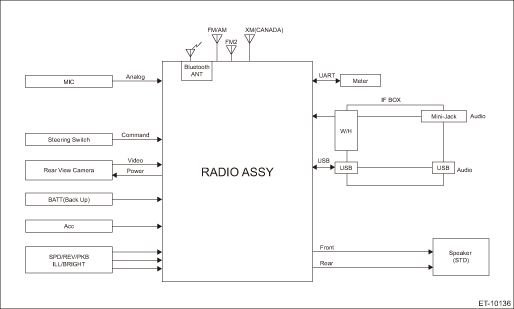
1. BASIC INSPECTION Model with 6.2 inch display 1. Using the Check List for Interview, ask the customer the condition of how the trouble occurred. Check List for Interview > CHECK 2. Check the battery. • H4 model: Battery > INSPECTION • H6 model: Battery > INSPECTION 3. Refer to “Diagnostics with Phenomenon” in “INFOTAINMENT SYSTEM (DIAGNOSTICS)”. Diagnostics with Phenomenon > LIST Model with 7 inch display Refer to “Basic Diagnostic Procedure” in “INFOTAINMENT SYSTEM (DIAGNOSTICS)”. Basic Diagnostic Procedure 2. SYSTEM BLOCK DIAGRAM Model with 6.2 inch display
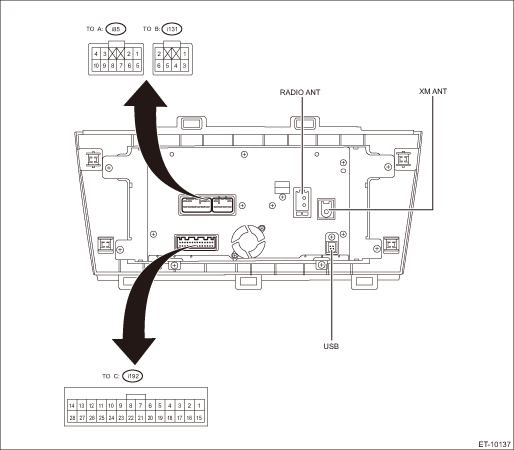
Model with 7 inch display Refer to “System Block Diagram” in “INFOTAINMENT SYSTEM (DIAGNOSTICS)”. Control Module I/O Signal > SYSTEM BLOCK DIAGRAM 3. MODULE I/O SIGNAL Model with 6.2 inch display
• Power supply and speaker output terminal
• Steering switch and AUX input terminal for microphone etc.
Model with 7 inch display Refer to “Control Module I/O Signal” of “INFOTAINMENT SYSTEM (DIAGNOSTICS)”. Control Module I/O Signal > ELECTRICAL SPECIFICATION |
 Wiring diagram
1. MODEL WITH 6.2 INCH DISPLAYRefer to “Audio System” in the wiring diagram. Audio System > WIRING DIAGRAM2. MODEL WITH 7 INCH DISPLAYRefer to “Audio System” in the wiring dia ...
 Operation
1. SUBARU STARLINK CONNECTION ID DISPLAYModel with 6.2 inch display1. Turn the ignition switch to ACC.2. Press the HOME button (a) to display the {HOME} screen.3. Touch the {SETTINGS} (b) to display t ...
Other materials:
Dtc p1451 evap system clog detected (pipe)
DTC DETECTING CONDITION:Detected when two consecutive driving cycles with fault occur.CAUTION:After servicing or replacing faulty parts, perform Clear Memory Mode Clear Memory Mode > OPERATION, and Inspection Mode Inspection Mode > PROCEDURE.STEPCHECKYESNO1.CHECK DRAIN TUBE BETWEEN CANISTER AND LE ...
