
Subaru Legacy BN/BS (2015-2019) Service Manual: Inspection
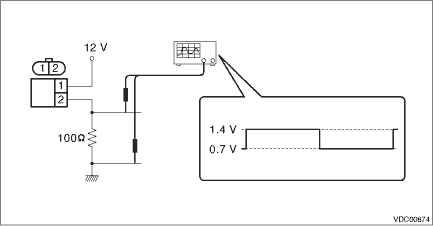
1. CHECK WITH SUBARU SELECT MONITOR 1. Connect the Subaru Select Monitor to data link connector. NOTE: For detailed operation procedures, refer to “Application help”. (1) On «Start» display, select «Diagnosis». (2) On «Vehicle selection» display, input the target vehicle information and select «Confirmed». (3) On «Main Menu» display, select «Each System». (4) On «Select System» display, select «Brake Control System» and select «Enter». (5) On «Select Function» display, select «Data Monitor». (6) From «Data monitor», select «RR Wheel Speed» and «RL Wheel Speed». 2. Check if the speed indicated on the display changes in the same manner as the speedometer reading during acceleration/deceleration when the steering wheel is in the straight-ahead position. 3. If the speed indicated on the display does not change in the inspection, check the ABS wheel speed sensor. Front ABS Wheel Speed Sensor > INSPECTION 2. CHECK ABS WHEEL SPEED SENSOR UNIT 1. Visually check the tip of the ABS wheel speed sensor for foreign particles or damage. If necessary, clean the tip or replace the ABS wheel speed sensor. 2. Disconnect the ABS wheel speed sensor connector. 3. Check the ABS wheel speed sensor cable for discontinuity. If defective, replace the ABS wheel speed sensor. 4. Connect a 12 V power supply to No. 1 terminal of ABS wheel speed sensor connector, then attach resistance to the No. 2 terminal. Rotate the wheel at about 2.75 km/h (2 MPH), and measure the voltage using an oscilloscope. Standard value of output voltage: 0.7 — 1.4 V
5. Replace the ABS wheel speed sensor if the inspection result is not within the standard value. |
 Removal
1. Disconnect the ground terminal from battery sensor. NOTE2. Lift up the vehicle, and then remove the rear wheels.3. Remove the trunk trim panel assembly - side (sedan model) or rear floor mat (OUTB ...
 Installation
CAUTION:• Be careful not to damage the sensor.• Do not apply excessive force to the sensor harness.1. Install the rear ABS wheel speed sensor.NOTE:Check the identification (mark) on the ha ...
Other materials:
Removal
1. SEDAN MODEL1. Disconnect the ground terminal from the battery sensor, and wait for at least 60 seconds before starting work. NOTE2. Remove the rear seat cushion.CAUTION:If the hook - rear seat (a) is disconnected from the vehicle body, make sure to replace the hook - rear seat with a new part to ...
