
Subaru Legacy BN/BS (2015-2019) Service Manual: Operation
1. While the VDC sequence control is performed, the operation of the hydraulic unit can be checked using the brake tester or pressure gauge after the hydraulic unit solenoid valve is operated. 2. VDC sequence control can be started by Subaru Select Monitor. 1. VDC SEQUENCE CONTROL WITH SUBARU SELECT MONITOR NOTE: In the event of any trouble, sequence control will not operate. 1. Connect the Subaru Select Monitor to data link connector. NOTE: For detailed operation procedures, refer to “Application help”. (1) Turn the ignition switch to ON. (2) On «Start» display, select «Diagnosis». (3) On «Vehicle selection» display, input the target vehicle information and select «Confirmed». (4) On «Main Menu» display, select «Each System». (5) On «Select System» display, select «Brake Control System» and select «Enter». (6) On «Select Function» display, select «Work Support». (7) On «Work Support» display, select «VDC Function Check Mode». 2. Operate according to the procedures displayed in the Subaru Select Monitor. 3. The brake system being operated is displayed on the Subaru Select Monitor. 2. CONDITIONS FOR VDC SEQUENCE CONTROL NOTE: The control operation starts at point A.
|
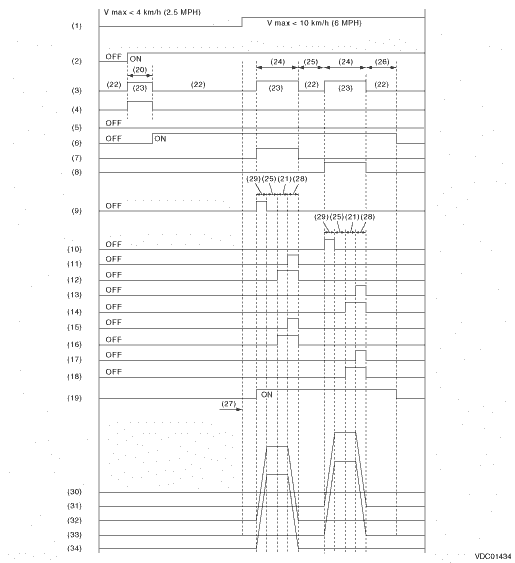
 Specification
1. CONDITIONS FOR COMPLETION OF VDC SEQUENCE CONTROLWhen the following conditions develop, the VDC sequence control stops and VDC operation is returned to the normal control mode.• When the spee ...

Other materials:
Preparation tool
1. SPECIAL TOOLILLUSTRATIONTOOL NUMBERDESCRIPTIONREMARKS — (Newly adopted tool)SUBARU SELECT MONITOR 4Used for setting of each function and troubleshooting for electrical system.NOTE:For detailed operation procedures of Subaru Select Monitor 4, refer to “Application help”.99099AL000PIS ...
