
Subaru Legacy BN/BS (2015-2019) Service Manual: Removal
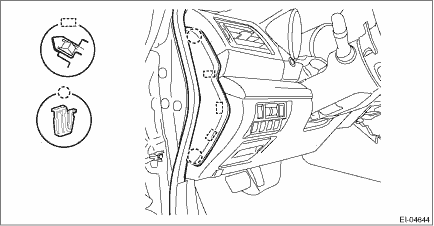
1. Disconnect the ground terminal from the battery sensor, and wait for at least 60 seconds before starting work. NOTE 2. Remove the clips, and remove the cover - instrument panel side LH.
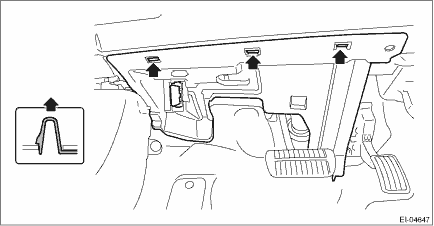
NOTE: Remove the weather strip - body side flange to facilitate the work. 3. Remove the data link connector and release the hook, and then remove the under cover assembly - driver.
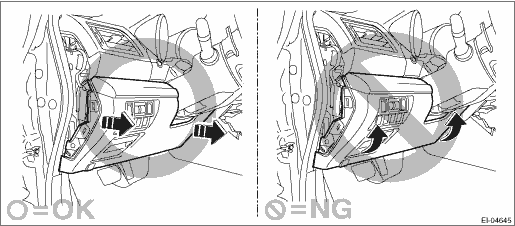
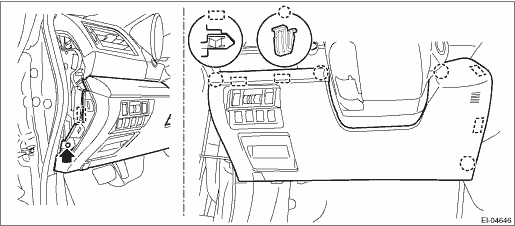
4. Remove the cover assembly - instrument panel LWR driver. CAUTION: When removing the cover assembly - instrument panel LWR driver, be sure to pull it toward you. If attempting to remove by turning it upward, the claws may be damaged.
(1) Remove the screws and release the clips and claws. (2) Disconnect the harness connectors, and remove the cover assembly - instrument panel LWR driver.
|

 Installation
1. Install the cover assembly - instrument panel LWR driver.2. Install the data link connector, and install the under cover assembly - driver.3. Install the cover - instrument panel side LH.4. Connect ...
Other materials:
System servicing
WARNING
When discarding a seatbelt retractor
assembly or scrapping
the entire vehicle damaged by a
collision, consult your SUBARU
dealer.
Tampering with or disconnecting
the system's wiring could result
in accidental activation of the
seatbelt p ...
