
Subaru Legacy BN/BS (2015-2019) Service Manual: Removal
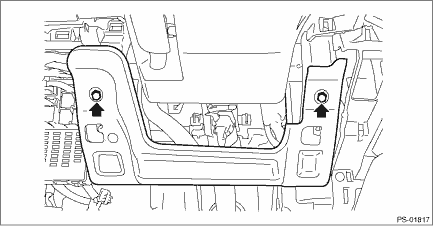
1. DRIVER’S SIDE 1. Disconnect the ground terminal from battery sensor. NOTE 2. Remove the cover assembly - instrument panel LWR driver. Instrument Panel Lower Cover > REMOVAL 3. Remove the bolts, and then remove the panel - knee guard.
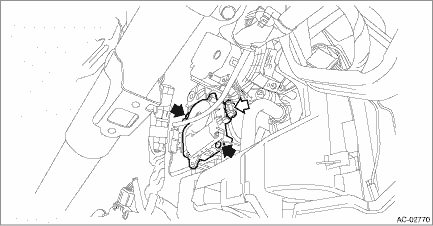
4. Remove the motor - actuator mix. (1) Disconnect the connector. (2) Remove the screws and detach the motor - actuator mix.
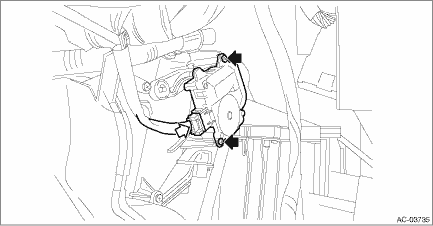
2. PASSENGER’S SIDE 1. Disconnect the ground terminal from battery sensor. NOTE 2. Remove the pocket assembly and the back panel - pocket. Glove Box > REMOVAL 3. Remove the motor - actuator mix. (1) Disconnect the connector. (2) Remove the screws and detach the motor - actuator mix.
|

 Inspection
1. ACTUATOR LINK1. Visually check the operating range of the link, and remove the foreign matter if any.2. Operate the temperature control switch, and check that the link operates normally.3. If it do ...
Other materials:
AUX
WARNING
Do not operate the player's controls
or connect the portable audio device
while driving. Doing so may result in
loss of control of your vehicle and
cause an accident or serious injury.
CAUTION
. Do not leave portable audio device
in the vehi ...
