
Subaru Legacy BN/BS (2015-2019) Owners Manual: Reverse Automatic Braking system ON/OFF setting
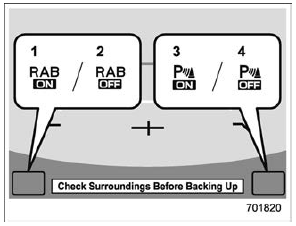
While the select lever is shifted to the "R" position, the below functions of the Reverse Automatic Braking system can be set by operating the audio/navigation monitor.
1) ON setting key of Reverse Automatic
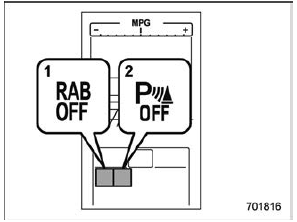
Braking When the ON setting key is shown, the corresponding setting is ON. Touch and hold the ON setting key to turn the setting OFF. When the OFF setting is shown, the corresponding setting is OFF. Touch and hold the OFF setting key to turn the setting ON. When the Reverse Automatic Braking system and/or the object detection warning beeping sounds are turned OFF, the following indicator(s) will illuminate.
1) RAB OFF indicator: illuminates when the
Reverse Automatic Braking system is
turned OFF. Each indicator will turn off when the corresponding function is turned ON. NOTE
Also, the following settings can be changed by operating the multi information display.
For details, refer to "RAB" . |
 RAB warning indicator
If the Reverse Automatic Braking System
malfunctions, the above indicator illuminates
on the combination meter. Contact
the nearest SUBARU dealer for details. ...
 Handling of the sonar sensors
The 4 sonar sensors are located in the
rear bumper. To ensure the proper operation
of the Reverse Automatic Braking
system, observe the following precautions.
Do not affix any stickers or o ...
Other materials:
Dtc c2546 eyesight value
DTC DETECTING CONDITION:When the steering support indication value from stereo camera is out of range after the ignition switch is ON.TROUBLE SYMPTOM:EyeSight steering support function does not operate.STEPCHECKYESNO1.CHECK POOR CONTACT OF CONNECTOR.Is there poor contact of the stereo camera connect ...
