
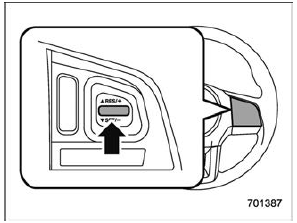
Subaru Legacy BN/BS (2015-2019) Owners Manual: To increase the speed (by the "RES/ SET" switch)
Press the "RES/SET" switch to the "RES" side and hold it until the vehicle reaches the desired speed. Then, release the switch. The vehicle speed at that moment will be memorized and treated as the new set speed. When setting the displayed unit as "MPH": The set speed can be increased 1 mph (1.6 km/h) each time by pressing the "RES/SET" switch to the "RES" side. When setting the displayed unit as "km/h": The set speed can be increased 1 km/h each time by pressing the "RES/SET" switch to the "RES" side. |

 To increase the speed (by accelerator pedal)
Depress the accelerator pedal to
accelerate the vehicle to the desired
speed.
Press the "RES/SET" switch to the
"SET" side once. Now the desired speed is set and the vehicle will ke ...
Other materials:
Operation
1. On «Start» display, select «Diagnosis».2. On «Vehicle selection» display, input the target vehicle information and select «Confirmed».3. On «Main Menu» display, select «Each System».4. On «Select System» display, select «Telematics» and then select «Enter».5. On «Select Functio ...
