
Subaru Legacy BN/BS (2015-2019) Owners Manual: By Dialpad
Subaru Legacy BN/BS (2015-2019) Owners Manual / Audio / Hands-free phone system / Making a call / By Dialpad
Input the phone number manually using the keypad displayed on the screen
When you enter a phone number on the
screen and select the |
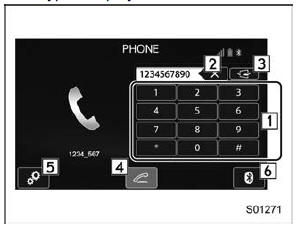
 key, the
"Outgoing
Call" screen opens.
key, the
"Outgoing
Call" screen opens. By contacts list
On the phone (menu) screen, select the
"Contacts" key to open the phone number
list screen.
You can make a call by selecting an item
in the list (up to five phone numbers are
listed).
If the ...
 By off hook switch
Calls can be made using the latest call
history item.
Press the off hook switch on the
steering wheel to display the phone
(menu) screen.
Check that the call screen is displayed ...
Other materials:
Read diagnostic trouble code (dtc) operation
1. On «Start» display, select «Diagnosis».2. On «Vehicle selection» display, input the target vehicle information and select «Confirmed».3. On «Main Menu» display, select «Each System».4. On «Select System» display, select «Infotainment» and select «Enter».5. On «Select Function» ...
© 2017-2026 Copyright www.sulegacy.com
