
Subaru Legacy BN/BS (2015-2019) Service Manual: Inspection
1. Set the vehicle to the following conditions.
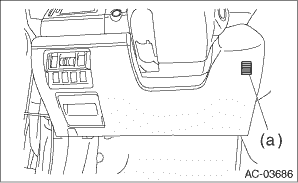
2. Check the suction port (a) for in-vehicle sensor of the cover assembly - instrument panel LWR driver.
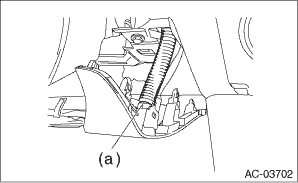
(1) Put a strip of paper close to the front side of the suction port (a). (2) Can you see the paper moving towards the port and the air being sucked into the port- CAUTION: Be careful not to let the paper get sucked into the port. • Yes > Go to step 5). • No > Go to step 3). 3. Remove the cover assembly - instrument panel LWR driver, and check the aspirator hose (a).
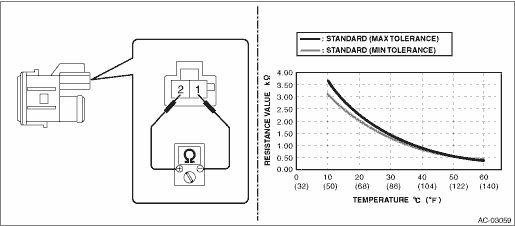
(1) Are the aspirator hoses on both sides of the case and sensor connected securely- (2) Is the aspirator hose free from any kinks or cracks- • Yes > Go to step 4). • No > Repair or replace the aspirator hose if necessary. 4. Check if there is anything that affects sensing, around the in-vehicle sensor. (1) Is the in-vehicle sensor hole free from clogging- (2) Is the peripheral area of in-vehicle sensor free from any heat-producing parts (such as audio, navigation system etc.)- • Yes > Go to step 5). • No > Remove everything that affects sensing. 5. Check in-vehicle sensor. (1) Disconnect the connector. (2) Measure the resistance between connector terminals. Preparation tool: Circuit tester CAUTION: During inspection, be careful not to touch the sensor end in order to avoid misjudgment due to body temperature.
• Yes > The in-vehicle sensor is normal. • No > Replace the in-vehicle sensor. |
 Removal
1. Disconnect the ground terminal from battery sensor. NOTE2. Remove the cover assembly - instrument panel LWR driver. Instrument Panel Lower Cover > REMOVAL3. Release the claws and remove the in-ve ...
 Installation
1. Install the in-vehicle sensor.2. Install the cover assembly - instrument panel LWR driver.3. Connect the ground terminal to battery sensor. NOTE ...
Other materials:
Dtc u0126 lost communication with steering angle sensor module
DTC DETECTING CONDITION:No data is received from steering angle sensor.TROUBLE SYMPTOM:VDC CM does not operate normally.STEPCHECKYESNO1.CHECK PERFORMING OF BASIC DIAGNOSTIC PROCEDURE.Was the basic diagnostic procedure performed up to STEP 8- Diagnostic Procedure with Diagnostic Trouble Code (DTC) > ...
