
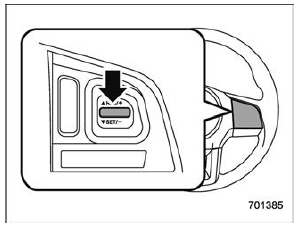
Subaru Legacy BN/BS (2015-2019) Owners Manual: To decrease the speed (by the "RES/SET" switch)
Press the "RES/SET" switch to the "SET" side and hold it until the vehicle reaches the desired speed. Then, release the switch. The vehicle speed at that moment will be memorized and treated as the new set speed. When setting the displayed unit as "MPH": The set speed can be decreased 1 mph (1.6 km/h) each time by pressing the "RES/SET" switch to the "SET" side. When setting the displayed unit as "km/h": The set speed can be decreased 1 km/h each time by pressing the "RES/SET" switch to the "SET" side. |
 To increase the speed (by accelerator pedal)
Depress the accelerator pedal to
accelerate the vehicle to the desired
speed.
Press the "RES/SET" switch to the
"SET" side once. Now the desired speed is set and the vehicle will ke ...
 To decrease the speed (by brake pedal)
Depress the brake pedal to release
cruise control temporarily.
When the speed decreases to the
desired speed, press the "RES/SET"
switch to the "SET" side once. Now the
desired sp ...
Other materials:
Installation
1. OIL FILTERCAUTION:Do not tighten excessively, or oil may leak.1. Clean the oil filter installing surface on the chain cover.2. Obtain a new oil filter and apply a thin coat of engine oil to the seal rubber.3. Install the oil filter by turning it by hand, being careful not to damage the seal rubbe ...
