
Subaru Legacy BN/BS (2015-2019) Owners Manual: By incoming calls
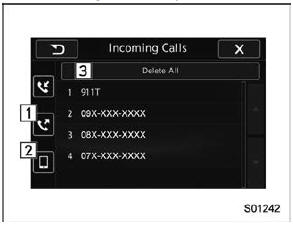
On the phone (menu) screen, select the "Incoming Calls" key to open the "Incoming Calls" screen. You can make a call by selecting an item in the incoming call history list. If there is no incoming call history, a message appears to indicate that there is no incoming call history data.
When you select an item in the history list on the "Incoming Calls" screen, the outgoing call screen opens NOTE
|
 Making a call
There are several methods by which a call
can be made, as described below.
Press the HOME button on the audio
panel.
Touch the "PHONE" key.
Select the desired key to make ...
 By outgoing calls
On the phone (menu) screen, select the
"Outgoing Calls" key to open the "Outgoing
Calls" screen. You can make a call
by selecting an item in the outgoing call
history list.
If there is no outgo ...
Other materials:
Removal
1. ENGINE SIDE1. Disconnect the ground terminal from battery sensor. NOTE2. Drain engine coolant. Engine Coolant > REPLACEMENT3. Remove the front exhaust pipe. Front Exhaust Pipe > REMOVAL4. Disconnect the radiator outlet hose from thermostat cover.5. Remove the thermostat cover, and then remove ...
