
Subaru Legacy BN/BS (2015-2019) Owners Manual: By outgoing calls
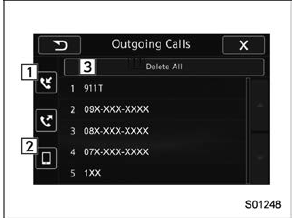
On the phone (menu) screen, select the "Outgoing Calls" key to open the "Outgoing Calls" screen. You can make a call by selecting an item in the outgoing call history list. If there is no outgoing call history, a message appears to indicate that there is no outgoing call history data.
When you select an item in the history list on the "Outgoing Calls" screen, the outgoing call screen opens. NOTE
|
 By incoming calls
On the phone (menu) screen, select the
"Incoming Calls" key to open the "Incoming
Calls" screen.
You can make a call by selecting an item
in the incoming call history list.
If there is no inc ...
 By contacts list
On the phone (menu) screen, select the
"Contacts" key to open the phone number
list screen.
You can make a call by selecting an item
in the list (up to five phone numbers are
listed).
If the ...
Other materials:
Inspection
1. LATCHPull the emergency lever to check that the latch operates properly.If latch deformation, abnormal wear, or unsmooth lock operation is observed, replace the power rear gate auto closer.2. ACTUATORPreparation tool:Circuit tester1. Check motor operation(1) Check the motor operation when battery ...
